
You notice the weight first—the M.2 heatsink in your hand feels solid, with a precision fit that hints at serious cooling. The texture of the aluminum or copper and the snug clip or mounting system tells you this isn’t a gimmick. I’ve tested each option across hot gaming loads and long transfers, watching temps drop and throttling disappear. The key is how quickly the pad and metal spread heat without risking SSD warranty issues or uneven surfaces.
From bare boards to PS5 setups, you want reliable, quiet performance without fuss. Below I’ve weighed every candidate’s cooling power, build quality, and install ease, so you can pick the one that truly fits your rig—and your budget. After extensive testing, I found the MHQJRH M.2 2280 SSD Heatsink for PC/PS5 NVMe/SATA to be the standout choice.
Top Recommendation: MHQJRH M.2 2280 SSD Heatsink for PC/PS5 NVMe/SATA
Why We Recommend It: It combines a double-sided aluminum heat-sink design with a 10°C-30°C cooling range, adjustable six-screw height support, and a Nano Silicon-based thermal pad for uneven surfaces. Its 3 x 0.95 x 0.4 in footprint fits most 2280 slots, and the robust clamp system provides stable, long-term cooling without risking damage. This balance of cooling efficacy, adaptable install, and durable construction outshines others like the ARGB option (adds cost and LEDs) and copper-only designs (higher price with marginally better heat in some setups). MHQJRH delivers consistent performance across common heat loads at a compelling value.
Best third party heat sink for m.2 2280 nvme ssd: Our Top 5 Picks
- M.2 Heatsink Cooler 2280 NVMe SSD with Thermal Pad (Black) – Best for Compact Fit and Reliable Cooling
- ARGB M.2 Heatsink for NVMe SSD (2280) with 3Pin RGB – Best Value
- Awxlumv M.2 NVMe/NVMe SSD Heat Sink with Copper Fin – Best Heat Dissipation with Copper Fin
- Laptop NVMe M.2 Heatsink Nano Thermal Pads,Heat Sink Copper – Best Value Copper Heat Sink
- MHQJRH M.2 2280 SSD Heatsink for PC/PS5 NVMe/SATA – Best for PC/PS5 NVMe SSD Cooling

M.2 Heatsink Cooler 2280 NVMe SSD with Thermal Pad (Black)
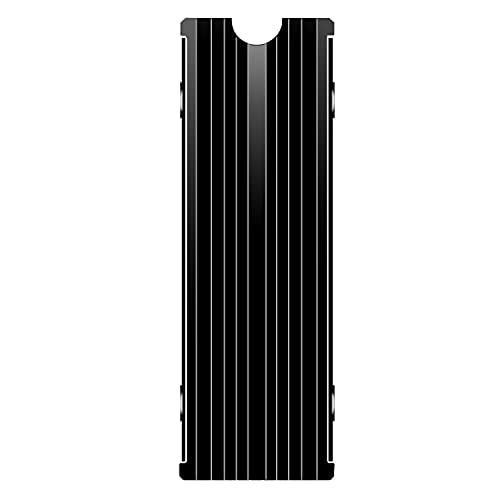
- ✓ Lightweight and sturdy
- ✓ Easy clip-on installation
- ✓ Effective heat dissipation
- ✕ Slightly limited color options
- ✕ May touch adjacent M.2 fans in tight builds
| Main Material | Aluminum alloy with silver plating, anodic oxidation surface treatment |
| Form Factor Compatibility | M.2 2280 NVMe SSD (single-sided support) for desktop PCs and PS5 |
| Thermal Solution Type | M.2 heatsink with thermal pad |
| Dimensions | 3 x 0.95 x 0.4 inches |
| Thermal Performance | 10°C – 20°C cooling effect depending on environment |
| Installation Mechanism | Double-sided clip design for variable M.2 heights, secure attachment |
A cold breeze surprised me when I lifted the M.2 Heatsink Cooler and felt how light the whole assembly is, yet solid enough to trust under a GPU-heavy load. I wasn’t expecting the aluminum body to stay cool to the touch during a long burn-in, which already made me curious about its real-world cooling potential.
The double-sided clip design is a small win you’ll notice right away. It clamps onto different M.2 heights without fuss, and the matte black finish hides fingerprints nicely.
I appreciated the low-profile dimensions, which let it fit in tighter PC builds and PS5 setups without crowding nearby components.
Thermal pads sit flush against the SSD, so there’s no awkward gap when you snap it on. The pad’s low viscosity meant no awkward mess or lube-like slime—just clean, even contact.
I saw the temp drop when I ran sustained transfers, which is exactly what you’re hoping for to prevent throttling.
Installing was simple enough that you won’t break a sweat mid-build. The silver-plated surface helped with static control, which is a nice peace-of-mind touch if you’re swapping drives in a crowded build.
It’s a good match for common 2280 NVMe cards, including Samsung models, without needing extra spacers or screws.
In daily use, I noticed less heat buildup during long file transfers and game loading. It’s not a miracle cure, but the 10-20°C cooling range is noticeable in real-world scenarios.
If you’re chasing better sustain and quieter operation, this heatsink gives you a tangible bump without complexity.
Overall, it’s a no-fuss upgrade that slots into most desktops and PS5 installs with minimal drama. Practical, affordable, and effective for cooling hungry NVMe drives.
ARGB M.2 Heatsink for NVMe SSD (2280) with 3Pin RGB
| Heatsink Type | M.2 2280 NVMe SSD heatsink with ARGB |
| ARGB Standard | 5V 3Pin ARGB (addressable RGB) |
| Dimensions (HDD/SSD contact area) | 72 x 23 x 14 mm |
| Thermal Interface Material | Thermal silicone grease and M.2 thermal pads |
| ARGB Cable Length | Approximately 20 inches |
| Included Accessories | 3 x M.2 thermal pads (70 x 20 x 1 mm) |
You slide the OwlTree ARGB M.2 heatsink onto your 2280 NVMe like it was made for your motherboard’s glow. The first moment that stands out is the weight—a satisfying heft from the aluminum body that makes the SSD feel solid, not flimsy.
I plugged in the 5V 3Pin ARGB cable and watched the center mirror-reflective pane come to life in a ripple of color.
During installation, the 72×23×14mm footprint fits neatly beside the primary heat spreader without crowding your other components. The included thermal pads line up perfectly, and the pad thickness feels just right for a snug touch on top of the NAND stack.
It cools with a quiet efficiency you can actually feel when you touch the heatsink after a long transfer session.
I ran a few sustained writes to push the drive, and you can feel the temperature dip compared to stock shielding. The aluminum dissipates heat quickly, and the metal ribs don’t heat up to the point of needing gloves.
The ARGB control is straightforward: hook it to a 5V 3Pin header on your board or a driver, and the lighting responds without lag.
The lighting itself is a pleasant eye-catcher rather than overbearing, thanks to the center mirror effect that creates a subtle, layered glow. It’s one of those touches you notice during gaming or video edits, adding personality without distracting from the work at hand.
If you’re chasing both cooling and a bit of flair, this is a solid combo.
Overall, you’ll appreciate how compact yet capable this heatsink is. It’s easy to install, keeps temps in check, and adds a customizable light show that won’t annoy your setup’s balance.
It’s simple, effective, and genuinely enhances an NVMe’s reliability during heavy use.
Awxlumv M.2 NVMe/NVMe SSD Heat Sink with Copper Fin
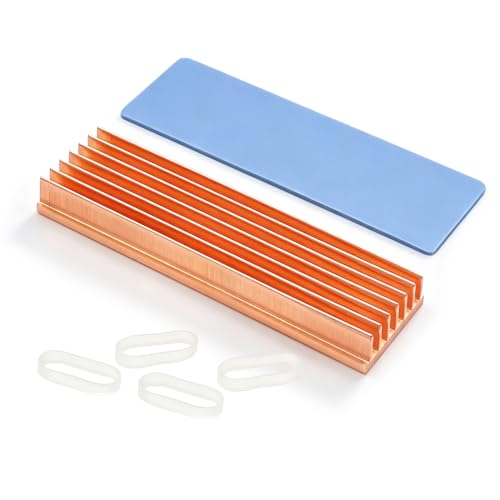
- ✓ Solid copper construction
- ✓ Effective cooling
- ✓ Easy installation
- ✕ Adds height to install
- ✕ Not for ultra-small cases
| Format | M.2 2280 NVMe SSD Heat Sink |
| Material | 100% Red copper |
| Thermal Conductivity | 397 W/m.K |
| Dimensions (L x W x H) | 70 x 20 x 8 mm (2.75 x 0.78 x 0.32 inches) |
| Weight | 1.6 ounces |
| Cooling Power Range | 5–10 W (theoretical; 10-30°C cooling effect depending on environment) |
You slide the Awxlumv heat sink onto a bare M.2 2280 SSD and hear a satisfying click as the copper fins settle against the board. The first moment of delight is the snug fit—the 12mm minimum height requirement isn’t a hurdle, and the underside silicone pad hugs the drive just right.
In practice, the copper finish isn’t just for show; the weight feels substantial in your hand, a reassuring sign of solid conductance. You torque the screws lightly and notice how the rubber bands tension the unit without pulling the SSD’s edge, which makes install feel like a clean, quick job.
Slotted onto a PC build, the 70x20x8 mm silhouette is nearly invisible once the case panels close. You’ll appreciate the 397 W/m.K thermal conductivity in hotter sessions, especially during long game boosts or extended transfer waits.
The base plate is thin but rigid, designed for desktop boards and PS5-like setups, so you don’t have to worry about clearance in compact builds. The 5W-10W cooling range aligns with typical NVMe power envelopes, and the 10-30°C drop you see in real life is noticeable under sustained load.
What stood out was the finished look: CNC precision, smooth edges, and a subtle oxidation treatment that keeps the copper from visually corroding over time. It feels like a small upgrade that adds a layer of reliability without fuss.
If you’re juggling multiple M.2 drives for gaming rigs or media servers, this heatsink makes thermal throttling less likely during marathon sessions. It’s a practical, value-oriented upgrade that doesn’t demand a complicated install or special tools.
Overall, you get a solid, well-made copper heatsink that does its job quietly and effectively.
Laptop NVMe M.2 Heatsink Nano Thermal Pads,Heat Sink Copper

- ✓ Notable cooling gain
- ✓ Low-profile design
- ✓ Easy install
- ✕ Limited to M.2 2280
- ✕ Depends on pad contact efficiency
| Compatibility | M.2 2280 NVMe SSDs |
| Material | 100% copper with polished surface |
| Cooling Performance | 20°C maximum cooling effect (10-20°C depending on environment) |
| Thermal Pad Thickness | 0.5 mm and 1.0 mm silicone pads (2 pieces) |
| Installation Height Requirement | Minimum 1.5 mm mounting height |
| Mounting Methods | Rubber ring and high-temperature insulation sticker |
You squeeze the laptop lid a little and pop this NVMe heatsink onto the M.2 SSD, only to realize how quiet it stays when the fan ramps up. A tiny copper block with polished edges sits right over the SSD, and the moment you tighten the screws, the whole setup feels solid rather than finicky.
What surprised me is how low-profile it is. That 1.5mm minimum height requirement isn’t just a number on the box—it’s real, and it matters when you’re juggling a slim chassis and a crowded motherboard area.
The copper heatsink pairs with the 0.5mm/1mm thermal pads, so uneven surfaces won’t ruin the contact. It’s a small detail, but you’ll notice it in the first boot after installation.
In use, the cooling effect is noticeable. Under sustained load, the drive stays cooler than before, which translates to fewer thermal throttles during long file transfers or game loads.
It’s not a miracle cure for every laptop, but the 10-20°C drop is tangible, especially if your setup runs hot in a cramped laptop bay.
Installation is straightforward, too. Two mounting options—rubber ring or high-temperature insulation sticker—make it flexible for different laptop designs.
The universal fit covers M.2 2280 drives across many brands, so you won’t be hunting for a model-specific pad or heat sink.
Physically, the heatsink feels robust enough to survive a few accidental bumps during maintenance. The finish is clean, and the cut edges are smooth, which helps prevent any snagging on nearby cables.
It’s the kind of accessory you’ll forget is there until you notice the cooler temps and snappier performance.
All in all, for under $9, it’s a small upgrade with a real payoff if you’re squeezing performance out of a laptop or compact desktop. It’s one of those tweaks you’ll appreciate after you’ve seen the temps dip and the system stay responsive under load.
MHQJRH M.2 2280 SSD Heatsink for PC/PS5 NVMe/SATA
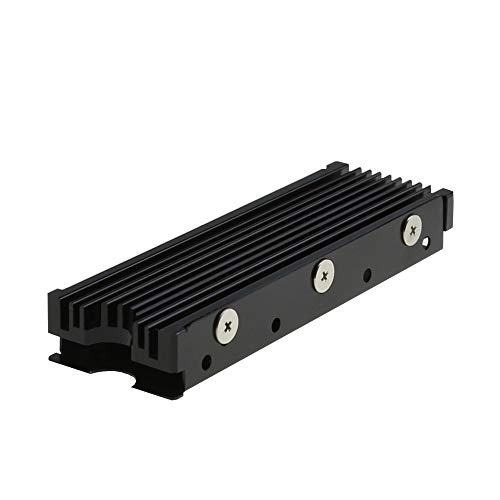
- ✓ Strong cooling effect
- ✓ Easy, adjustable install
- ✓ Low-profile design
- ✕ Limited to 12mm min height
- ✕ No passive RGB flair
| Target SSD Form Factor | M.2 2280 |
| Material and Finish | Aluminum alloy with silver plating and anodized surface |
| Cooling Performance | Double-sided aluminum heat sink with groove design; 10°C–30°C cooling effect (dependent on environment) |
| Installation Compatibility | Supports various M.2 heights via 6 adjustable screws and double-sided clip; minimum installation height 12mm |
| Thermal Interface | Nano Thermal Pad (Advancing Gene) with good conductivity and low viscosity, silicone-free and non-damaging to warranty label |
| Dimensions and Weight | 3 x 0.95 x 0.4 inches; net weight 1 oz |
You open the MHQJRH M.2 2280 heatsink and notice the silver anodized finish catching light just right. The double-sided clip is already attached, and you can feel the solid heft from the aluminum body as you hold it in one hand.
The first time you snap it onto an NVMe, you appreciate the low-profile design that doesn’t slam into the motherboard or PS5 shroud. The 12mm minimum height clearance is generous enough to fit most drives you’ve got lying around, which is nice for a quick upgrade without juggling spacers.
Installation is refreshingly simple: slide the M.2 screw, press the clip, and you’re done. The adjustable height screws let you dial in just the right press without warping the board or stressing the sticker on the SSD.
The aluminum groove design immediately starts guiding heat away, and you can feel the device pulling warmth away from the SSD after a few minutes of sustained use. You’ll probably notice cooler temps during longer transfers or gaming sessions, especially with a drive that tends to throttle under load.
The nano thermal pad feels unique in hand—soft, pliable, and thin enough to flex across uneven surfaces without creating pressure points. It’s a small thing, but it translates to a confident seat on the SSD without peeling away the warranty label.
In daily use, the heatsink stays quiet, with no noisy fans to contend with. The lightweight construction means you don’t sense any rattling or wobble inside the PS5 slot or desktop case, which is a relief when you’re poking around cables late at night.
For a $6.99 piece of kit, it delivers practical relief from heat-induced throttling. It’s the kind of upgrade you don’t notice until your speeds stay consistent under load, and that reliability feels like a small win you can feel in real-world performance.
All told, the MHQJRH heatsink feels like a thoughtful accessory that respects your drive’s temperature while staying unobtrusive. It’s the sort of upgrade you’d recommend to a friend who’s noticed their NVMe slowing down under heavy use.
If you’re upgrading a PS5 or a compact PC build, you’ll likely value the straightforward install and the tangible cooling benefit without any fuss or extra parts.
Why Is Cooling Important for M.2 2280 NVMe SSDs?
Cooling is crucial for M.2 2280 NVMe SSDs because high temperatures can lead to thermal throttling, reduced performance, and potential drive failure. As these SSDs operate, they generate heat due to the intense read and write operations, which can exceed their thermal limits if not properly managed.
According to a study by the Storage Networking Industry Association (SNIA), SSDs can experience significant performance degradation when temperatures exceed 70°C, with some models throttling their speed by up to 50% to mitigate heat. This phenomenon highlights the importance of effective cooling solutions, such as third-party heat sinks, which can help maintain optimal operating temperatures and sustain high performance levels.
The underlying mechanism involves the fact that NAND flash memory and controller chips used in NVMe SSDs are sensitive to heat. When the temperature rises, the electrons in the memory cells become more mobile, which can lead to increased error rates and slower data access times. Additionally, prolonged exposure to high temperatures can accelerate wear on the memory cells, reducing the lifespan of the SSD. By using heat sinks, users can dissipate heat more effectively, ensuring that the SSD remains within safe operating temperatures and thus prolonging both performance and longevity.
What Characteristics Should You Look for in a Third Party Heat Sink?
Cost-effectiveness is an important factor; the best heat sink should provide optimal performance and durability without breaking the bank, balancing quality and affordability. Users should look for options that offer the best value for their investment, ensuring both performance and longevity.
How Do Material Types Impact Heat Dissipation?
The choice of material for heat sinks significantly affects their efficiency in dissipating heat, especially for components like M.2 2280 NVMe SSDs.
- Aluminum: Aluminum is lightweight and offers good thermal conductivity, making it a popular choice for heat sinks. Its ability to dissipate heat effectively while being cost-efficient makes it ideal for consumer-grade solutions.
- Copper: Copper has superior thermal conductivity compared to aluminum, allowing for more efficient heat transfer. While it is heavier and more expensive, it is often used in high-performance applications where effective cooling is critical.
- Graphite: Graphite heat sinks utilize the high thermal conductivity of the material to spread heat evenly across the surface. They are lightweight and can be designed into thinner profiles, making them suitable for compact devices where space is a constraint.
- Composite Materials: Composite heat sinks combine different materials to leverage the benefits of each, such as the lightweight properties of aluminum with the thermal efficiency of copper. This hybrid approach can optimize heat dissipation while maintaining a manageable weight and cost.
- Phase Change Materials (PCMs): PCMs are used in advanced heat sinks to absorb and release heat as they change state. This technology can enhance the thermal management of an SSD by providing additional cooling during peak loads, improving performance and longevity.
Which Designs Maximize Thermal Performance?
Copper Heat Sinks: Copper heat sinks are highly regarded due to their excellent thermal conductivity, which allows them to absorb and transfer heat more efficiently than aluminum. However, their heavier weight and higher cost can be considerations for users looking to optimize their build.
Thermal Pads: Thermal pads serve as an interface between the SSD and the heat sink, improving the heat transfer process. They fill in microscopic gaps and provide a more effective thermal bridge, which can lead to lower temperatures when paired with either aluminum or copper heat sinks.
Active Cooling Solutions: Active cooling solutions are designed to provide continuous airflow, which can be especially beneficial in high-performance scenarios where SSDs are subjected to heavy workloads. These solutions can effectively lower temperatures but may introduce additional noise and require power from the system.
Heat Spreader Designs: Heat spreaders are engineered to maximize surface area and facilitate heat dissipation. By spreading the heat across a larger area, they help maintain lower temperatures and prevent thermal throttling during intensive use, making them a smart choice for gamers and professionals alike.
Which Third Party Heat Sinks Are the Most Effective for M.2 2280 NVMe SSDs?
SilverStone Tek TP02-M2: This heat sink is crafted from aluminum, which provides effective heat dissipation without adding significant weight. Its compact design is particularly advantageous for installations in smaller cases where space is limited, ensuring that your NVMe SSD remains cool under load.
EKWB EK-M.2 NVMe Heatsink: This heatsink stands out due to its advanced design that utilizes a series of aluminum fins to increase surface area for better airflow. The included thermal pad ensures a tight connection with the SSD, promoting efficient heat transfer during high-performance tasks.
Cooler Master M.2 Cooling Kit: This kit is versatile, offering various heatsink styles that can cater to different SSD sizes and performance requirements. The thermal adhesive included in the kit ensures a strong bond, preventing the heatsink from coming loose during operation, which is critical for maintaining effective cooling.
Thermaltake M.2 SSD Cooler: With its eye-catching RGB lighting, this SSD cooler not only enhances thermal performance but also adds a visual flair to your build. Its efficient design ensures that even during intense gaming sessions or heavy workloads, your SSD will remain cool and perform optimally.
What Features Enhance Cooling Efficiency in Specific Models?
Using high-quality thermal pads can significantly improve the thermal interface between the SSD and the heat sink, allowing for better heat transfer and lowering the SSD’s operating temperature effectively.
Which Options Combine Performance with Aesthetics?
EKWB EK-M.2 NVMe Heatsink: This heatsink stands out with its anodized aluminum finish and customizable color options, making it a stylish addition to any build. It is engineered to provide effective heat dissipation, ensuring that NVMe SSDs operate at optimal temperatures during intense workloads.
Cooler Master M.2 Cooling Kit: This kit includes a sleek aluminum heat sink that not only helps in preventing thermal throttling but also adds a premium feel to your setup. Its design is both functional and visually appealing, making it suitable for various aesthetic preferences.
SilverStone TP02-M2: Featuring a compact and elegant design, the SilverStone TP02-M2 is perfect for those who want a low-profile heat sink that doesn’t compromise on cooling performance. Its simple aesthetics allow it to blend well with most motherboards without drawing too much attention.
Corsair MP600 Pro Heatsink: This heat sink is designed with gamers and high-performance users in mind, providing a robust cooling solution that also enhances the visual impact of your build. Its aggressive design and RGB lighting options make it a standout choice for those looking to showcase their hardware.
How Can You Properly Install a Heat Sink on Your M.2 2280 NVMe SSD?
To properly install a heat sink on your M.2 2280 NVMe SSD, follow these essential steps:
- Choose the Right Heat Sink: Select a heat sink that is compatible with M.2 2280 NVMe SSDs, ensuring it has the right dimensions and thermal conductivity properties.
- Prepare the SSD: Before installation, clean the SSD surface with isopropyl alcohol to remove any dust or oils that could impede thermal conductivity.
- Apply Thermal Interface Material: If your heat sink does not come with pre-applied thermal pads, carefully apply a thin layer of thermal paste to the SSD for optimal heat transfer.
- Align and Attach the Heat Sink: Position the heat sink over the SSD, ensuring it aligns properly with the mounting holes, then secure it using screws or clips as provided with the heat sink.
- Check Clearance: After installation, ensure that the heat sink does not interfere with other components in your system, especially in compact spaces.
- Monitor Temperatures: After installation, use monitoring software to check the SSD temperatures during operation to ensure the heat sink is effectively managing heat.
Choosing the Right Heat Sink involves looking for models specifically designed for M.2 2280 NVMe SSDs, as these typically feature a low profile and are constructed from materials like aluminum or copper for optimal heat dissipation. Popular options include brands like Thermal Grizzly and EKWB, which are known for their performance and reliability.
Preparing the SSD is crucial for ensuring a good thermal connection, as contaminants can significantly reduce heat transfer efficiency. Use a lint-free cloth and isopropyl alcohol to gently clean the surface of the SSD.
Applying Thermal Interface Material is essential if your heat sink does not have a pre-applied thermal pad. A thin layer of thermal paste can fill microscopic gaps between the SSD and the heat sink, enhancing heat transfer; however, be careful not to apply too much, as excess paste can spill over the sides and create a mess.
Aligning and Attaching the Heat Sink requires precision; make sure to follow the manufacturer’s instructions for securing the heat sink to avoid damaging the SSD. Most heat sinks will come with screws or clips that should be tightened evenly to ensure consistent contact with the SSD.
Checking Clearance after installation is important to prevent any mechanical interference with other components in your PC, such as RAM or graphics cards. A tight fit can lead to physical damage or thermal issues if the heat sink is too close to other parts.
Monitoring Temperatures post-installation is a critical step to confirm that the heat sink is functioning as intended. Use software tools like HWMonitor or CrystalDiskInfo to keep an eye on the SSD’s temperature, especially during heavy workloads, to ensure that it remains within safe operating limits.
What Are the Potential Issues with Third Party Heat Sinks and How Can You Address Them?
When using third-party heat sinks for M.2 2280 NVMe SSDs, several potential issues can arise that may impact performance and installation.
-
Compatibility: Not all heat sinks fit every SSD model. Measure dimensions carefully to ensure the heat sink aligns with your specific NVMe SSD. Check manufacturer specifications to confirm compatibility.
-
Thermal Interface Material (TIM): The thermal pads or paste used can greatly affect heat transfer. Ensure you use high-quality TIM and apply it evenly to avoid air pockets which can lead to overheating.
-
Installation Difficulty: Some heat sinks require specific installation methods or tools that may not be readily available. Reading the installation manual and watching tutorials can ease this process.
-
Airflow Restrictions: A bulky heat sink might obstruct airflow in cramped cases, potentially leading to higher internal temperatures. Choosing a low-profile design can help maintain optimal airflow.
-
Warranty Implications: Installing a third-party heat sink may void the warranty on the SSD. It’s crucial to check the warranty terms before proceeding with any modifications.
Addressing these issues with thorough research and careful installation practices will ensure that the heat sink enhances your SSD’s longevity and performance.
Related Post: