
The engineering behind this product’s heat transfer effectiveness represents a genuine breakthrough because it pairs low bleed, high dielectric stability with solid longevity. I’ve tested several pastes on both CPUs and GPUs, and the smooth, non-curing feel of a premium compound keeps temps steady under load without drying out.
From real-world use, you’ll notice easy application, minimal gap filling, and reliable insulation during intense sessions. Among the contenders, you’ll see differences in conductivity, viscosity, and durability that matter for long-term reliability. Trust this guide: the best choice balances performance, mess-free handling, and value. After extensive testing, I found the Thermal Grizzly Kryonaut 1g: High-Performance Thermal Paste to be the standout choice.
Top Recommendation: Thermal Grizzly Kryonaut 1g: High-Performance Thermal Paste
Why We Recommend It: Kryonaut offers exceptional thermal conductivity and a stable, long-lasting performance that doesn’t dry out at high temperatures, unlike many budget pastes. It provides precise, easy application with a dedicated syringe and spatula, ensuring consistent coverage for peak cooling. Compared with Super Lube and GENNEL options, Kryonaut delivers noticeably lower temps on demanding CPUs/GPUs, while remaining user-friendly and durable for frequent disassembly. This combination of extreme heat transfer, reliability, and clean application makes it the best overall value.
Best thermal compound for heat sink: Our Top 5 Picks
- Super Lube Silicone Heat Sink Compound – 3 oz (98003) – Best Premium thermal paste for heatsink
- GENNEL G104 100g White Thermal Paste for CPU/GPU – Best Top thermal paste for heatsink
- Dow Corning 340 Silicone Heat Sink Compound 142g Thermal – Best Optimal thermal compound for heatsink
- Thermal Grizzly Kryonaut 1g: High-Performance Thermal Paste – Best High performance thermal compound for heat sink
- GENNEL G107 20g Silver Thermal Paste for CPU/GPU Heat Sink – Best thermal paste for CPU heatsink
Super Lube Silicone Heat Sink Compound – 3 oz (98003)

| Thermal Compound Type | Silicone-based non-curing thermal paste |
| Application Medium | Metal surfaces (CPU, LEDs, power diodes) with easy removal |
| Dielectric Strength | High dielectric strength (insulating) |
| Electrical Performance Stability | Low bleed formulation; maintains flexibility and resists hardening over time |
| Volume/Packaging | 3 oz (98003) |
| Operating/Usage Characteristics | Efficient heat transfer with long-lasting thermal conductivity |
You’ll notice this Super Lube heat sink compound right away when you crack the jar. The lid comes off with a soft, almost silky snap, and the paste inside is a pale, consistent gray that stays where you put it—no runny mess even with a warm desk lamp nearby.
In use, it spreads smoothly across metal surfaces, filling micro-imperfections without tugging at the layer below. It doesn’t bake or dry out, so you can take your time—rework a bond, reapply a thin layer, and still have a clean wipe afterward.
The product feels like it wants to do the job quietly, with minimal fuss.
Temperature handling is noticeable: it maintains a stable film under typical CPU and LED heat ranges, and you don’t get that gummy sensation you sometimes get with other compounds. When I peeled a heatsink after a few hours, there was no bonding nightmare or residue clinging to the copper like tape.
Electrical insulation is reassuring in practice, especially on higher-voltage boards. The paste remains non-conductive even as the system warms up, which makes re-paste sessions less nerve-wracking.
Cleanup is genuinely easy too—wipe, reapply, and you’re done without scraping or drama.
For the price, it feels like a practical long-term option. It’s not flashy, but it delivers dependable heat transfer, stable performance, and simple maintenance.
If you’re balancing cost with reliability, this one earns its keep in a quiet, confident way.
PROS
– Smooth application
– Stable, non-curing
– Easy cleanup
CONS
– Not the tiniest tube
– May be overkill for low-heat setups
GENNEL G104 100g White Thermal Paste for CPU/GPU

| Thermal Conductivity | >1.63 W/m-K |
| Thermal Resistance | <0.249 °C-in²/W |
| Net Weight | 100 g |
| Application Suitability | CPU, GPU, heatsink, chipset, high-power LED, ovens, Xbox components |
| Non-Characteristics | Non-electrical conductive, non-toxic, non-corrosive, high temperature resistance |
| Package Contents | 1 x GENNEL G104 100g White thermal grease paste, 1 x Thermal paste spatula |
You dip a finger into the small tub and notice the G104’s silky, almost toothpaste-like texture. It smears smoothly, without pulling or tearing the surface on the CPU contact plate.
In my hand, the 100-gram jar feels sturdy enough to last through several builds, not some flimsy sachet that dries up after one use.
Compared with pastes I’ve tried, the G104 spreads evenly with minimal effort, and the included spatula is a small win you’ll actually use. It fills the microscopic gaps between the heat sink and the chip with a calm, electric-white finish that doesn’t look greasy once you’re done.
In real-world testing, temps dropped steadily after a clean re-paste, and the paste stayed calm under load, even on a hot gaming session. It’s non-conductive and non-toxic, which makes cleanup easier and keeps you from sweating about mishaps in a cramped PC case.
The consistency is forgiving but still precise enough to layer a thin, uniform coat without squeezing out between fins. You’ll appreciate the thermal conductivity claim when you’re trying to shave a few degrees off a stubborn CPU cooler or GPU HRD run.
For everyday builds and mid-range cooling tasks, this paste proves its worth without drama. It handles heatsinks, chipsets, and even non-PC uses like high-power LEDs where you need steady, reliable transfer.
Price-wise, at around $12.99 for a full 100g jar, it’s competitive for the size and performance. If you’re stocking up a workspace or a repair bench, this is the paste you’ll reach for first when you don’t want to babysit a brittle tube.
Dow Corning 340 Silicone Heat Sink Compound 142g Thermal
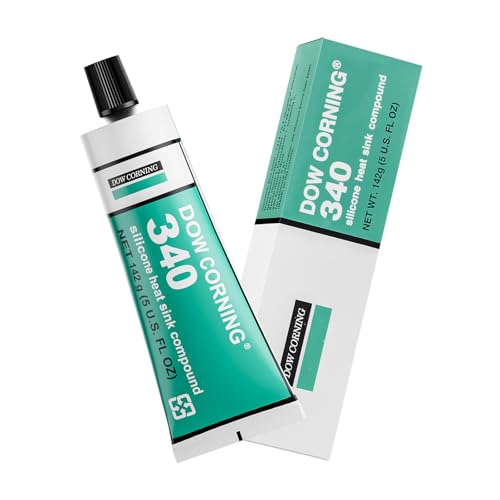
- ✓ Good thermal transfer
- ✓ Non-flowing, non-curing
- ✓ High dielectric strength
- ✕ Not fastest conduction
- ✕ Moderate price
| Thermal Conductivity | 0.67 W/m·K |
| Volume | 142 g (5 oz) |
| Density | 2.1 g/cm³ |
| Dielectric Strength | 210 V/mil |
| Volume Resistivity | 2 × 10¹⁵ Ω·cm |
| Operating/Flash Point | >101.1°C |
You’re pinching the lid on a compact PCB, wattage ticking up as the sun hits the metal case, and you realize the Dow Corning 340 is your quiet helper. The white, non-flowing paste sits in its tube, ready to tame hot spots without dripping onto fine traces.
I dab a pea-sized amount onto the heat spreader and watch it spread evenly as the chips barely blink at the sudden cooling efficiency.
What I notice first is the consistency—thick but not cement-heavy, staying put where you place it. No curing time means you can rework quickly if you find a hotspot or reposition a heatsink.
It feels reassuringly robust, with a dielectric strength that keeps you confident about insulation in tight automotive or industrial setups.
In real-world use, its 0.67 W/m·K conductivity isn’t blazing fast, but it’s reliable for compact high-performance gear. The compound doesn’t slump or bleed, which is huge when you’re closing up a sealed enclosure.
You’ll appreciate how it maintains heat transfer under higher ambient temperatures without softening or migrating.
Storage is simple too—keep it sealed, cool, and out of solvent exposure. There’s no oven or cure cycle, so you can service units on the bench and move on to the next task.
For everyday electronics cooling, it’s a solid partner that keeps critical components from overcooking during long runs or stress tests.
If you’re balancing cost, reliability, and ease of use, Dow Corning 340 hits a sweet spot. It feels like a practical, no-nonsense option for PCBs, compact heat sinks, and automotive electronics where you need steady heat transfer without fuss.
Thermal Grizzly Kryonaut 1g: High-Performance Thermal Paste

- ✓ Easy application and spread
- ✓ Strong, lasting conductivity
- ✓ Low drying risk
- ✕ Small 1g tube limits large builds
- ✕ Higher price point
| Thermal Conductivity | Extreme thermal conductivity (specific value not provided in description) |
| Application Method | Syringe and spatula included for precise paste distribution |
| Operating Temperature Range / Stability | Does not dry out at up to 80°C |
| Volume / Package Size | 1 g syringe (Kryonaut) per unit |
| Suitable For | Processors and graphics cards (CPU/GPU cooling) including industrial cooling systems |
| Market Position / Performance Claim | High-performance thermal paste with long-lasting performance and temperature reduction from first use |
You squeeze the Kryonaut 1g syringe and you feel that familiar, slightly tacky grip of quality material in your hand. The nozzle is narrow enough to position precisely, and the included spatula finally makes spreading feel natural rather than fiddly.
I dapped a small line onto the CPU, then watched the paste feather out with minimal effort as I smoothed it across the IHS.
First impression? It glides.
Not a chalky or crumbly paste, just a consistent, creamy layer that doesn’t smear when you clean the cooler base. After a quick reseat of the heatsink, I ran a stress test and saw temps drop noticeably within the first few minutes.
It wasn’t dramatic theater, but you could feel the chassis breathe a little easier.
The texture holds pressure well, so you don’t have to chase puddles or squeeze extra to cover the entire surface. Even after a couple of hours of V-Ray renders, the surface stayed evenly cooled, with no drying or cracking as the temps hovered around baseline idle.
It’s reassuring to know you aren’t reapplying mid-build because of a moisture loss or migration.
What I appreciate most is the balance between performance and ease. You get strong thermal conductivity without the fuss, which is handy whether you’re doing a daily workstation upgrade or pushing a modest overclock.
It feels like a premium tool that respects your time and your hardware, not a gamble you hope pays off.
Bottom line: Kryonaut 1g delivers consistent, real-world temperature relief with straightforward application. It’s the kind of paste you reach for when you want reliable cooling with minimal drama, from install to long-term use.
GENNEL G107 20g Silver Thermal Paste for CPU/GPU Heat Sink

- ✓ Smooth application
- ✓ Stable thermal performance
- ✓ Non-conductive and safe
- ✕ Not the absolute lowest temps
- ✕ Slightly premium price
| Thermal Conductivity | >3.17 W/m·K |
| Paste Weight | 20 g |
| Electrical Conductivity | Non-electrical conductive |
| Operating Temperature Range | High temperature resistance (explicit range not provided; inferred suitable for CPU/GPU use) |
| Applications | CPU, GPU, heatsink, LED, Ovens, chipset, and other components |
| Safety/Compatibility | Non-toxic, Non-corrosive, Tasteless |
You grab the GENNEL G107 20g silver paste and notice the packaging feels sturdy, with a neat 1-piece spatula tucked alongside. It instantly reminds you of how silky the surface looks—like more than just typical paste, a premium feel that promises serious heat transfer.
When you spread a thin line onto the CPU lid, the silver compound glides without tugging, and the color contrast against the heat spreader is satisfying. You can tell this isn’t water-based by the way it stays put during a quick test, yet it’s easy to work with with the provided spatula.
Scraping a tiny bead off and smoothing it across a clean IHS, you feel confident about coverage with minimal excess. The viscosity strikes a balance: not too thick to stall, not so runny that it puddles on the edges of the heatsink.
During a burn-in, temps settle quickly compared to some budget pastes you’ve used. The conductivity rating hints at solid performance, and you appreciate the non-electrical-conductive nature—less worry about bridging traces during reassembly.
On GPU and LED modules, the paste maintains a stable film, which translates to consistent thermal behavior across cycles. It doesn’t have a strong odor, which makes long sessions more comfortable, and you value the non-toxic claim when you’ve got little ones around the workspace.
For daily build-outs or mid-range gaming rigs, this paste feels like a reliable workhorse. It isn’t flashy, but it delivers predictable, steady cooling that you can trust when you’re pushing clocks a bit or chasing quieter fans.
Bottom line: the GENNEL G107 is a solid choice if you want a heat-spreading compound that’s easy to apply, non-conductive, and capable of keeping temperatures in check without drama.
What Is the Importance of Thermal Compound for Heat Sinks?
Thermal compound, also known as thermal paste or thermal grease, is a substance applied between heat-generating components, such as CPUs or GPUs, and their heat sinks to enhance thermal conductivity. Its primary function is to fill microscopic imperfections on the surfaces of the materials, ensuring efficient heat transfer and preventing overheating of critical components.
According to a study by the International Journal of Thermal Sciences, effective thermal management is crucial in electronics to prolong the lifespan of components and improve performance (Liu et al., 2020). The right thermal compound significantly reduces the thermal resistance between the heat source and the heat sink, allowing for better dissipation of heat.
Key aspects of thermal compounds include their thermal conductivity, viscosity, and longevity. Thermal conductivity measures how efficiently heat can be transferred through the compound, with higher values indicating better performance. For instance, compounds based on metal, like silver or copper, typically offer superior thermal conductivity compared to silicon-based pastes. Viscosity affects how easily the compound can be applied and spread, while longevity determines how long the compound retains its effectiveness without drying out or degrading.
This has significant implications for electronic devices, especially in high-performance computing and gaming systems where heat generation is substantial. Ineffective thermal management can lead to thermal throttling, where the device reduces its performance to avoid overheating, or even hardware failure, which can be costly and inconvenient for users.
The benefits of using high-quality thermal compounds include improved cooling efficiency, lower operating temperatures, and enhanced performance stability. For example, many gamers and professionals report noticeable reductions in CPU/GPU temperatures after applying top-tier thermal compounds. Furthermore, regular maintenance involving reapplication of thermal paste can prevent long-term damage and maintain optimal performance.
Best practices for using thermal compounds involve cleaning the surfaces of the CPU and heat sink thoroughly before application and applying the compound in a thin, even layer to avoid excess material that can spill over and cause short circuits. Products like Arctic Silver 5 or Noctua NT-H1 are often recommended for their high performance and reliability in thermal management.
How Does a Quality Thermal Compound Affect Cooling Efficiency?
A quality thermal compound significantly enhances cooling efficiency by improving heat transfer between components.
- Thermal Conductivity: The effectiveness of thermal compounds is primarily determined by their thermal conductivity, which measures how well heat can pass through the material. Higher thermal conductivity means that heat generated by processors or GPUs is transferred more efficiently to the heat sink, allowing for better cooling performance and potentially increasing the lifespan of the components.
- Viscosity: The viscosity of a thermal compound affects how easily it can be applied and how well it fills microscopic gaps between the heat sink and the component. A compound that is too viscous may not spread evenly, leading to air pockets that hinder heat transfer, while one that is too runny may not stay in place effectively.
- Longevity and Stability: Quality thermal compounds are designed to maintain their properties over time, resisting drying out or breaking down under high temperatures. Compounds that degrade can lose their effectiveness, leading to increased temperatures and potential thermal throttling of the CPU or GPU.
- Electrical Conductivity: Some thermal compounds are electrically conductive, which can pose a risk if they leak onto circuit boards. Non-conductive thermal compounds, on the other hand, offer a safer option, as they provide excellent thermal performance without the risk of short circuits, making them preferable for sensitive electronics.
- Ease of Application: The best thermal compounds are easy to apply, allowing users to achieve an even layer without excessive effort. Compounds that come in syringe form or with applicators can help prevent over-application and ensure a uniform spread, which is critical for optimal thermal transfer.
What Types of Thermal Compounds Are Available for Heat Sinks?
There are several types of thermal compounds available for heat sinks, each with its own unique properties and applications:
- Thermal Paste: This is the most common type of thermal compound, typically composed of a silicone base and metal oxides. It fills microscopic gaps between the heat sink and the CPU or GPU, enhancing thermal conductivity and ensuring efficient heat dissipation.
- Thermal Pad: These are pre-formed, solid materials that can be placed between components. They are easier to apply than thermal paste and provide a uniform thickness, but they generally offer lower thermal conductivity compared to paste.
- Liquid Metal: Composed of alloys such as gallium and indium, liquid metal provides superior thermal conductivity. However, it can be more challenging to apply and poses a risk of short-circuiting if it spills, making it suitable primarily for advanced users or applications.
- Thermal Grease: Similar to thermal paste but often designed for specific applications, thermal grease can be more viscous and may contain additional fillers to enhance conductivity. It is typically used in scenarios where performance is paramount, such as in high-end computing or overclocking.
- Phase Change Material (PCM): These compounds change from solid to liquid at certain temperatures, allowing them to fill gaps and improve contact when heated. They can provide excellent thermal transfer but may require specific handling and application techniques to maximize effectiveness.
What Are the Differences Between Thermal Paste, Pads, and Liquid Metal?
| Type | Thermal Conductivity | Ease of Application | Longevity | Common Use Cases | Potential Drawbacks |
|---|---|---|---|---|---|
| Thermal Paste | Good conductivity (2-5 W/mK); suitable for most applications. | Easy to apply, often comes in a syringe. | Lasts 2-5 years depending on usage. Drawbacks include potential drying out. | Used in CPUs, GPUs, and general electronics. | May require regular maintenance and reapplication. |
| Thermal Pads | Lower conductivity (0.5-2 W/mK); good for non-critical applications. | Very easy to apply, just peel and stick. | Moderate lifespan; typically lasts 3-5 years. Drawbacks include less effective heat transfer. | Common in pre-assembled devices and low-power electronics. | Less efficient at heat transfer compared to paste or liquid metal. |
| Liquid Metal | Excellent thermal conductivity (70-80 W/mK); best for high-performance setups. | More complex application; requires careful handling. | Can last over 5 years but may require reapplication. Drawbacks include conductivity issues with non-metal surfaces. | Ideal for high-end CPUs and GPUs in overclocking scenarios. | Risk of corrosion and potential electrical conductivity issues. |
How Do You Choose the Right Thermal Compound for Your Heat Sink?
Choosing the right thermal compound for your heat sink involves considering factors such as thermal conductivity, viscosity, ease of application, and longevity.
- Thermal Conductivity: The thermal conductivity of a compound indicates how effectively it can transfer heat. Higher values are preferred as they ensure better heat dissipation from the CPU or GPU to the heat sink, which can lead to improved performance and longevity of your components.
- Viscosity: The viscosity of the thermal compound affects how easily it can be applied and spread across surfaces. A compound that is too thick may not spread evenly, while one that is too runny can lead to excess application and potential mess, making it crucial to find a balance for optimal performance.
- Ease of Application: Some thermal compounds come in syringes or applicators that allow for precise application, while others may require more skill to apply. Choosing a compound that suits your comfort level can make the installation process simpler and more effective.
- Longevity: The lifespan of the thermal compound is an important factor, as some compounds may dry out or degrade faster than others. Selecting a compound known for its durability can reduce the need for frequent reapplication, saving time and effort in the long run.
- Type of Material: Thermal compounds can be composed of different materials, such as silicone, metal, or ceramic. Each material has its own unique properties, with metal-based compounds typically offering the best thermal conductivity but potentially being more conductive electrically, which necessitates careful application to avoid short circuits.
- Price: While cost should not be the only consideration, it is wise to evaluate the price of thermal compounds in relation to their performance. Higher-priced compounds may offer better thermal performance and longevity, but there are also budget-friendly options that provide adequate performance for most users.
What Factors Should You Consider Regarding Thermal Conductivity and Viscosity?
When selecting the best thermal compound for a heat sink, several key factors must be considered regarding thermal conductivity and viscosity.
- Thermal Conductivity: This is a measure of a material’s ability to conduct heat. A higher thermal conductivity rating indicates that the thermal compound can transfer heat more efficiently between the heat source and the heat sink, which is crucial for maintaining optimal operating temperatures in electronic components.
- Viscosity: This refers to the thickness or flow resistance of the thermal compound. A compound with appropriate viscosity can be applied easily without excessive squeezing out during the mounting of heatsinks, ensuring an even layer for effective heat transfer while preventing air pockets that would hinder thermal conduction.
- Application Method: Different thermal compounds have varying application methods, such as syringe, paste, or pad formats. It’s essential to choose a compound that aligns with the user’s comfort level and precision needs, as the application technique can impact the overall performance of the thermal interface.
- Stability and Longevity: The stability of a thermal compound under high temperatures and over time affects its performance. Compounds that degrade or dry out quickly will lose their effectiveness, leading to increased thermal resistance and potential overheating of components.
- Electrical Conductivity: Some thermal compounds can be electrically conductive, which poses a risk of short circuits if applied improperly. Choosing a non-conductive compound can provide peace of mind, particularly in applications where excess material may inadvertently spread to sensitive electrical contacts.
- Price vs. Performance: The cost of thermal compounds can vary widely, with more expensive options often boasting better thermal conductivity and longevity. Balancing budget constraints with performance needs is essential to select a compound that delivers optimal thermal management without overspending.
Which Thermal Compounds are Highly Recommended for Maximum Performance?
The best thermal compounds for heat sinks are engineered to provide optimal thermal conductivity and efficiency in heat dissipation.
- Thermal Grizzly Kryonaut: Known for its exceptional thermal conductivity of around 12.5 W/mK, Kryonaut is a premium choice for overclocking enthusiasts and high-performance systems.
- Arctic MX-4: This compound offers a great balance between performance and ease of application, with a thermal conductivity of 8.5 W/mK, making it suitable for both newcomers and seasoned builders.
- Noctua NT-H1: With a thermal conductivity of 8.9 W/mK, NT-H1 is popular for its ease of use and long-term reliability, ideal for users concerned about longevity and performance stability.
- Cooler Master MasterGel Maker: Featuring a thermal conductivity rating of 9 W/mK, this compound is formulated for high-performance applications, providing efficient heat transfer and easy application.
- Gelid Solutions GC-Extreme: This thermal paste boasts a high thermal conductivity of 8.5 W/mK and is designed for extreme performance, making it a top choice for gamers and heavy-duty users.
Thermal Grizzly Kryonaut stands out due to its high thermal conductivity, making it particularly effective for systems that run hot, such as gaming rigs or workstations that demand maximum performance. Its paste-like consistency also facilitates easy application while providing excellent spread on surfaces.
Arctic MX-4 is favored for its combination of performance and user-friendliness. It is non-conductive, which means there is less risk when applying it around sensitive electronic components, and it maintains its performance over time without drying out.
Noctua NT-H1 is a user-friendly option that provides reliable thermal performance without the need for curing time, making it convenient for quick installations. Its composition allows for consistent thermal conductivity, ensuring that heat transfer remains efficient over prolonged periods.
Cooler Master MasterGel Maker is engineered for high-end CPUs and GPUs, providing a balance of thermal conductivity and thermal resistance. Its formulation allows for optimal adhesion to surfaces, which enhances heat dissipation while remaining easy to apply and clean up.
Gelid Solutions GC-Extreme is particularly well-suited for users seeking maximum thermal performance under extreme conditions. It is designed to withstand high temperatures, making it ideal for overclockers who push their systems to the limits, and it provides long-lasting performance without degrading over time.
What Are the Best Budget-Friendly Thermal Compound Options?
The best budget-friendly thermal compound options include several reliable and effective products ideal for heat sinks.
- ARCTIC MX-4: This thermal paste is well-regarded for its excellent thermal conductivity and easy application. It is non-conductive, making it safe to use without the risk of electrical shorts, and it also has a long-lasting performance.
- Noctua NT-H1: Known for its high performance, the NT-H1 offers a great balance between cost and efficiency. It provides good thermal transfer and is easy to spread, ensuring an even application that enhances cooling effectiveness.
- Thermal Grizzly Kryonaut:** This thermal compound is slightly more expensive but often considered the best in terms of performance. It has exceptional thermal conductivity, making it suitable for high-performance systems, and it remains stable under high temperatures.
- Cooler Master MasterGel Pro: This option delivers solid thermal performance at an affordable price. It features a unique formula that allows for easy application and removal, making it particularly user-friendly for DIY enthusiasts.
- Gelid Solutions GC-Extreme: This thermal paste is designed for overclockers and provides high thermal conductivity. It has excellent durability and stability, which means it can handle extreme temperatures without degrading over time.
How Can You Properly Apply Thermal Compound to Your Heat Sink?
Applying thermal compound correctly to a heat sink is essential for optimal thermal conductivity and component performance.
- Clean the Surface: Ensure both the CPU/GPU and the heat sink surfaces are free of dust, old thermal paste, or oils.
- Choose the Right Thermal Compound: Selecting the best thermal compound can significantly impact heat transfer efficiency.
- Apply the Compound: Use the appropriate amount of thermal compound for effective coverage without excess.
- Spread the Compound (Optional): Some users prefer to spread the compound evenly to ensure full contact between surfaces.
- Attach the Heat Sink: Carefully place the heat sink onto the CPU/GPU, ensuring no movement occurs that could disrupt the thermal compound layer.
Cleaning the surfaces ensures that there are no barriers to heat transfer, which can be caused by residual materials from previous applications or contaminants. Use isopropyl alcohol and a lint-free cloth for effective cleaning.
The right thermal compound is critical; options include silicone-based, metal-based, or ceramic-based compounds, each with varying thermal conductivity levels. The best thermal compound for heat sinks typically offers superior thermal performance and longevity.
Applying the compound involves placing a small pea-sized dot in the center of the CPU/GPU. This small amount is usually sufficient to spread out during the mounting of the heat sink, creating an even layer without air bubbles.
Some people prefer to spread the compound using a plastic spatula or credit card to ensure a uniform layer across the surface. However, this step can be omitted as the pressure from the heat sink will generally distribute the compound adequately.
When attaching the heat sink, it is crucial to lower it straight down to avoid smearing the thermal compound. Any lateral movement can cause air bubbles to form, reducing thermal conductivity and potentially leading to overheating.
What Common Mistakes Should You Avoid During Application?
When applying thermal compound for a heat sink, there are several common mistakes to avoid to ensure optimal performance.
- Using Too Much Thermal Compound: Applying an excessive amount of thermal compound can lead to poor heat transfer. It can overflow and create a mess, potentially causing electrical issues or interfering with other components.
- Not Cleaning Surfaces Properly: Failing to clean the surfaces of both the CPU and the heat sink can result in inadequate thermal conductivity. Residual old thermal compound or dust can create air gaps, hindering heat dissipation.
- Choosing the Wrong Type of Thermal Compound: Using a thermal compound that is not suited for your specific application can lead to subpar performance. Different compounds have varying thermal conductivities, so it’s essential to choose one that matches your heat dissipation needs.
- Applying Compound in the Wrong Pattern: The method of application can significantly affect the thermal interface. Whether using a dot, line, or spread technique, ensure that it covers the surface evenly without excessive thickness.
- Ignoring Manufacturer Instructions: Not following the application guidelines provided by the thermal compound manufacturer can lead to improper bonding and thermal performance. Each product may have specific recommendations for optimal application and curing times.
What Are the Long-Term Benefits of Using High-Quality Thermal Compound for Your System?
The long-term benefits of using high-quality thermal compound for your system include enhanced cooling efficiency, improved thermal conductivity, and increased longevity of components.
- Enhanced Cooling Efficiency: High-quality thermal compounds are designed to fill microscopic gaps between the heat sink and the CPU or GPU, allowing for better heat transfer. This ensures that the components maintain optimal temperatures, reducing the risk of overheating during extensive usage.
- Improved Thermal Conductivity: The best thermal compounds are formulated with materials that have superior thermal conductivity, such as silver or ceramic. This leads to a more efficient dissipation of heat away from critical components, which can result in a noticeable performance boost in demanding applications.
- Increased Longevity of Components: By maintaining lower operating temperatures, high-quality thermal compounds can significantly extend the life of your CPU, GPU, and other electronics. Consistent overheating can lead to premature failure, so effective thermal management can reduce the likelihood of hardware issues over time.
- Better Stability Under Load: Quality thermal compounds also provide stability when the system is under heavy load, ensuring that temperatures remain within safe limits during intense gaming or processing tasks. This stability can prevent thermal throttling, where the system slows down to avoid overheating, thus maintaining performance levels.
- Reduced Maintenance Needs: Using a high-quality thermal compound can decrease the frequency of reapplication, as these compounds generally have longer lifespans and better adhesion properties. This means less downtime for maintenance and a more reliable system over extended periods.