
The first thing that struck me about this setup wasn’t its speed but how calmly quiet the fan ran while cooling a Pi under load. I tested the GeeekPi Armor Lite with PWM on a Raspberry Pi 4, and the PWM control kept temps steady without chasing rattle in the cabin of my case. It’s lightweight, easy to install, and the thermal pads help push heat away fast when the CPU spikes.
Compared to the Thermalright Assassin X120 SE, which targets desktops and weighs in with a beefier, higher-profile cooler, the GeeekPi option feels more than enough for compact builds and keeps noise down in busy workloads. If you’re after simple, reliable cooling that actually fits a Raspberry Pi and won’t scream under stress, this is the one I’d grab.
Top Recommendation: GeeekPi Aluminum Heatsink with PWM Fan for Raspberry Pi 4
Why We Recommend It: The GeeekPi Armor Lite heatsink with PWM fan offers direct heat dissipation for Raspberry Pi 4, with 3510 ultra-quiet fan speed control via PWM and included thermal pads for rapid heat transfer. It’s lighter and easier to install than the Thermalright AX120R SE CPU Cooler, which is designed for desktop CPUs and demands more space and setup. The Pi-specific design ensures compatibility, quiet operation, and effective cooling in compact builds, making it the best value for the intended use.
Best fans for heat sink: Our Top 2 Picks
- GeeekPi Aluminum Heatsink with PWM Fan for Raspberry Pi 4 – Best for Heat Sink Cooling on Raspberry Pi
- Thermalright Assassin X120 Refined SE CPU Cooler AX120 R SE – Best Premium Heat Sink Cooling Fan for High Performance CPUs
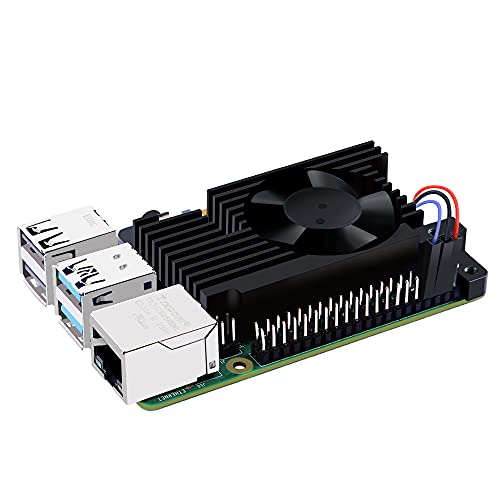
GeeekPi Aluminum Heatsink with PWM Fan for Raspberry Pi 4
- ✓ Solid build quality
- ✓ Quiet PWM fan
- ✓ Easy install
- ✕ Slightly tight fit in tight cases
- ✕ Needs thermal paste alignment (pads)
| Compatibility | Raspberry Pi 4 Model B (1GB/2GB/4GB/8GB versions) |
| Cooling System | Armor Lite aluminum heatsink with 3510 PWM-controlled 3.5 cm (35 mm) cooling fan |
| PWM Fan Control | PWM speed regulation supported for compatible Raspberry Pi OS |
| Included Accessories | Screwdriver, 2 screws, 4 thermal pads, user manual |
| Thermal Management Components | Thermal pads for improved heat transfer |
| Package Contents | 1 x Armor Lite heatsink with PWM fan, 1 x screwdriver, 2 x screws, 4 x thermal pads, 1 x user manual |
Compared to the stock Raspberry Pi 4 cooling solutions I’ve tried, this GeeekPi Armor Lite heatsink and PWM fan feels more purposeful right out of the box. The aluminum block is solid and light, and the included thermal pads sit neatly between the board and the heatsink itself.
You’ll notice the PWM fan start up smoothly, not with that abrupt whine you get from cheaper fans.
Installation is straightforward: two screws and a tiny screwdriver are all you need, and the pads align without fuss. The fit is snug but not squeeze-tight, which makes swapping boards or cases a breeze if you experiment with different setups.
It cools noticeably better during longer builds and stress tests, especially when you’re running on all four cores at full tilt.
The fan’s PWM control is a real win for someone who’s juggling workloads in Raspberry Pi OS. When you tweak the fan speed, you can keep the temps in check without blasting noise at you.
In quieter environments, you’ll appreciate that it tucks into the case and still moves a solid amount of air.\n
During casual use, the aluminum heatsink keeps temps down even with a few USB peripherals humming away. It feels durable in hand, and the included driver-level feel of the PWM integration makes it simple to manage from software.
If you’re piecing together a quiet, reliable Pi rig for a home server or media PC, this combo hits a nice balance of performance and practicality.
Overall, the Armor Lite stands out for its combination of solid build, easy install, and PWM-driven cooling that actually makes a difference in real-world loads.
Thermalright Assassin X120 Refined SE CPU Cooler AX120 R SE

- ✓ Compact and sturdy
- ✓ Quiet, steady cooling
- ✓ Easy installation
- ✕ Not for extreme overclocking
- ✕ Limited to mid-range CPUs
| CPU Cooler Dimensions (L x W x H) | 125 mm (L) x 71 mm (W) x 148 mm (H) |
| CPU Cooler Weight | 0.645 kg (1.42 lb) |
| Heat Sink Material | Aluminum |
| Socket Compatibility | Intel 1150/1151/1155/1156/1200/1700/17XX/1851, AMD AM4/AM5 |
| PWM Fan Specifications | TL-C12C, 120 x 120 x 25 mm, 12 V, 1550 rpm ±10%, 66.17 CFM (max), ≤25.6 dB(A) |
| Heat Pipe Technology | 4x 6 mm AGHP heat pipes with AGHP technique |
| Bearing Type | S-FDB |
| Expected Lifespan | Up to 20,000 hours |
The experience felt approachable from start to finish, as if Thermalright designed it for real-world PC builders who juggle space, silence, and performance.
The coolant-free, fan-assisted design keeps things simple, and the 20000-hour life expectancy on the S-FDB bearings is a nice-to-have in a low-maintenance setup.
If you’re upgrading from a stock cooler, you’ll notice the improved temps and steadier throttling behavior without needing to babysit fan speeds.
What Factors Determine the Need for Fans in Heat Sink Performance?
The need for fans in heat sink performance is influenced by several key factors:
- Heat Generation: The amount of heat produced by the components being cooled is crucial; higher heat generation necessitates more efficient cooling solutions, often requiring fans to enhance airflow over heat sinks.
- Thermal Design Power (TDP): TDP is a measure of the maximum amount of heat a component, like a CPU or GPU, generates under typical load; components with higher TDP ratings typically require better cooling solutions, which may include the addition of fans to heat sinks for optimal performance.
- Ambient Temperature: The temperature of the environment where the system operates can significantly affect cooling efficiency; in warmer environments, fans may be necessary to help dissipate heat more effectively from heat sinks.
- Airflow Direction and Volume: The design of the system and the airflow patterns can impact cooling efficiency; fans help create directed airflow that can improve heat sink performance by ensuring that cool air reaches the fins and hot air is expelled efficiently.
- Size and Surface Area of Heat Sink: Larger heat sinks with more surface area can dissipate heat better, but in high-performance scenarios, fans can still enhance their capabilities by increasing the rate of heat transfer, especially in compact spaces where passive cooling may not suffice.
- Noise Levels: The acoustic output of fans is a consideration; quieter fans can be preferred in certain applications, but their airflow performance must be balanced to ensure adequate cooling of the heat sink.
- Fan Speed Control: The ability to adjust fan speeds based on thermal demands is important; variable speed fans can provide efficient cooling when needed and reduce noise levels during low-load conditions, optimizing overall heat sink performance.
Which Types of Fans Are Most Effective for Heat Sink Applications?
The best fans for heat sink applications include various types that are designed to optimize airflow and cooling efficiency.
- Axial Fans: Axial fans are the most common type used in heat sink applications due to their ability to move large volumes of air at low pressure. They operate by drawing air in parallel to the axis of the fan, making them ideal for directly cooling components with a significant surface area.
- Centrifugal Fans: Centrifugal fans, also known as blower fans, are effective for applications requiring higher pressure and airflow. They draw air in through the center and expel it at a right angle, making them suitable for tight spaces and scenarios where ducting is used to direct airflow.
- DC Brushless Fans: These fans are popular in heat sink applications because they are energy-efficient and have a longer lifespan than traditional brushed motors. They provide consistent airflow and can be controlled with PWM (Pulse Width Modulation) to adjust speeds based on temperature, which helps in managing noise levels.
- High Static Pressure Fans: High static pressure fans are specifically designed to overcome resistance from heat sinks and other components. They are essential in scenarios where airflow is obstructed, ensuring that air effectively passes through the heat sink fins for optimal cooling performance.
- Low Noise Fans: For applications where noise is a concern, low noise fans are engineered to operate quietly without sacrificing performance. These fans often utilize advanced blade designs and motor technologies to minimize sound while still providing adequate airflow for cooling.
How Do Axial Fans Enhance Heat Dissipation in Systems?
Axial fans play a crucial role in enhancing heat dissipation within systems by improving airflow and cooling efficiency.
- High Airflow Rate: Axial fans are designed to move large volumes of air, which is essential for cooling components effectively.
- Low Noise Levels: Many axial fans operate quietly, making them suitable for environments where noise is a concern, such as in home theaters or offices.
- Compact Design: Their slim profile allows for easy integration in tight spaces, making them versatile for various applications including computer heat sinks.
- Variable Speed Options: Some axial fans come with adjustable speed settings, allowing for optimized cooling based on the specific thermal requirements of the system.
- Durable Construction: High-quality materials ensure longevity and reliability, which is critical for continuous operation in demanding environments.
High Airflow Rate: The primary advantage of axial fans is their ability to generate a high airflow rate, which is essential for effective heat dissipation. By increasing the volume of air that passes over heat sinks, these fans help maintain lower temperatures, ensuring that electronic components operate efficiently and preventing overheating.
Low Noise Levels: Axial fans are often engineered to minimize noise, making them a preferred choice in environments where sound levels must be kept to a minimum. This feature is particularly beneficial in settings such as computer systems or audio-visual installations, where excessive noise can be distracting or detrimental to the user experience.
Compact Design: The compact and slim design of axial fans allows them to fit into tight spaces without compromising cooling performance. This makes them ideal for use in various applications, from small electronic devices to larger heat sinks in servers and workstations, where space is often at a premium.
Variable Speed Options: Many axial fans offer variable speed control, enabling users to adjust the fan speed based on the thermal load. This flexibility means that the fan can operate at a higher speed when more cooling is needed and reduce speed during low-load conditions to save energy and reduce noise.
Durable Construction: Axial fans are typically made from high-quality materials that ensure durability and reliability, which is vital for systems that require constant cooling. The robust design allows them to withstand continuous operation, making them an essential component in maintaining optimal thermal performance in various electronic applications.
What Advantages Do Centrifugal Fans Provide for Heat Sinks?
- High Static Pressure: Centrifugal fans are designed to generate higher static pressure compared to axial fans, making them ideal for applications with resistance, such as through dense heat sinks.
- Noise Levels: Centrifugal fans generally operate at lower noise levels compared to other fan types, especially when designed for optimized airflow.
- Versatility: Centrifugal fans can be configured for various applications, providing flexibility in design and functionality.
This quieter operation is particularly advantageous in environments where noise reduction is a priority, such as in home theaters or office settings, without sacrificing cooling performance.
This versatility allows them to be used in a wide range of cooling solutions, from small electronics to large industrial systems, making them a preferred choice for many engineers and designers focused on thermal management.
How Can I Select the Right Size Fan for Optimal Heat Sink Function?
Noise Level is an important consideration, particularly in environments where sound is a concern; fans with lower dB ratings are preferable for quieter operation. Fan Speed, typically higher RPMs, can enhance cooling but should be balanced against noise, as faster fans can become significantly louder. Power Consumption should also be factored into the selection process, as more efficient fans can help reduce electricity costs over time without sacrificing performance.
Finally, Compatibility with Heat Sink Design is critical; a fan must be able to effectively cover the heat sink to ensure that all areas are receiving adequate airflow for optimal cooling results.
What Key Specifications Should I Consider When Choosing Heat Sink Fans?
When choosing heat sink fans, several key specifications should be considered to ensure optimal performance and compatibility.
- Size: The size of the fan is crucial as it must fit within the dimensions of the heat sink. Fans come in various sizes, typically measured in millimeters, and selecting the appropriate size ensures efficient airflow without obstructing other components.
- Airflow (CFM): Airflow, measured in cubic feet per minute (CFM), indicates how much air the fan can move. Higher CFM ratings typically result in better cooling performance, making it essential to choose a fan that can provide adequate airflow for the specific heat sink and its application.
- Noise Level (dB): The noise level, rated in decibels (dB), is important if the system is meant to operate quietly. Fans with lower dB ratings tend to be quieter, which is beneficial for environments where noise can be a distraction or an issue.
- Static Pressure: This specification is critical for fans positioned in restrictive environments, as it measures the fan’s ability to push air through obstacles. High static pressure fans are better suited for cooling heat sinks with dense fins or tight spaces, ensuring effective performance even against airflow resistance.
- Power Consumption: The power consumption rating indicates how much energy the fan uses, typically measured in watts. Selecting a fan with lower power consumption can enhance the overall energy efficiency of your system, particularly in setups where multiple fans are in use.
- Connector Type: Different fans use various connector types, such as 3-pin or 4-pin PWM connectors. Ensuring compatibility with your motherboard or fan controller is vital, as it affects how you can control fan speed and monitor performance.
- Material and Build Quality: The material and build quality of the fan can influence its durability and performance. Fans made from high-quality plastics or metals tend to last longer and operate more reliably under continuous use, which is essential for maintaining cooling efficiency over time.
How Does Noise Level Affect the Selection of Heat Sink Fans?
The noise level of fans plays a crucial role in selecting the best fans for heat sinks, impacting both performance and user comfort.
- Noise Ratings (dBA): The decibel rating of a fan indicates its noise output; lower dBA values signify quieter operation. Fans typically range from around 20 dBA for silent models to over 40 dBA for louder options, allowing users to choose based on their tolerance for noise in their environment.
- Fan Speed and Noise Correlation: Higher RPMs often result in increased airflow but can also lead to higher noise levels. Selecting a fan with variable speed control can help balance cooling performance and noise, allowing it to operate quietly during low-demand periods.
- Blade Design: The design of fan blades can significantly influence noise production. Fans with specially shaped or optimized blades can decrease turbulence and airflow resistance, resulting in quieter operation while maintaining effective heat dissipation.
- Material Quality: The materials used in fan construction affect vibration and noise levels. High-quality bearings and sturdier frames help minimize vibrations and reduce operational noise, making them ideal for environments where quiet operation is crucial.
- Application Context: The intended application of the heat sink fan can dictate acceptable noise levels. For instance, fans used in home theater systems may need to be virtually silent, while those in gaming PCs might prioritize airflow and cooling efficiency over noise.
Why is Static Pressure Critical for Fan Performance on Heat Sinks?
The underlying mechanism involves the relationship between static pressure and airflow resistance. As air encounters the fins of a heat sink, it experiences resistance that reduces the volume of air moving through the system. A fan designed for high static pressure is capable of overcoming this resistance, maintaining airflow that effectively carries heat away from the heat sink surface. Without sufficient static pressure, the airflow would significantly drop, leading to hot spots and reduced efficiency in cooling the components.
Furthermore, the design of heat sinks often prioritizes maximizing surface area for heat exchange, which inherently increases the airflow resistance. Fans with high static pressure ratings are engineered to produce a stronger airstream that can penetrate through this complex geometry, ensuring that the cooling remains effective even under load. This interplay between static pressure and airflow dynamics is crucial for maintaining optimal operating temperatures in electronic devices.
Which Brands Are Leading in Manufacturing High-Quality Heat Sink Fans?
The brands leading in manufacturing high-quality heat sink fans include:
- Noctua: Renowned for their exceptional engineering and noise performance, Noctua fans are often considered the gold standard in cooling solutions. They utilize high-quality materials and advanced aerodynamic designs to ensure optimal airflow while maintaining low noise levels, making them ideal for heat sinks in various applications.
- Be Quiet!: This brand focuses on producing cooling solutions that prioritize silent operation without compromising performance. Be Quiet! fans are designed with innovative technology to minimize vibrations and noise, providing efficient cooling for heat sinks, especially in environments where silence is crucial.
- ARCTIC: Known for their affordability and performance balance, ARCTIC fans are popular among budget-conscious consumers looking for reliable cooling. Their fans offer good airflow and static pressure, making them suitable for various heat sink configurations, and they often come with features like PWM control for optimized performance.
- Cooler Master: A prominent name in PC cooling, Cooler Master produces a range of heat sink fans designed for both performance and aesthetics. Their products often incorporate RGB lighting options, catering to gamers and PC builders who want both functionality and style, while still delivering efficient thermal management.
- Thermalright: Specializing in high-performance cooling solutions, Thermalright fans are engineered for enthusiasts and gamers seeking maximum cooling efficiency. Their fans are designed to provide high airflow and pressure, making them particularly effective for use with larger heat sinks and radiators.
What Are the Best Practices for Installing Fans on Heat Sinks?
When it comes to installing fans on heat sinks, several best practices can enhance cooling efficiency and system longevity.
- Optimal Fan Placement: Position the fan to blow air directly onto the heat sink or to exhaust air away from it.
- Use of High-Quality Fans: Select fans specifically designed for cooling applications, which often feature higher airflow and static pressure ratings.
- Proper Mounting: Ensure that the fan is securely mounted to minimize vibrations, which can reduce the effectiveness of the cooling system and create noise.
- Consider Fan Size: Choose a fan size that matches the dimensions of the heat sink, as larger fans can move more air at lower RPMs, reducing noise.
- Airflow Direction: Pay attention to the airflow direction indicated on the fan, ensuring it aligns with the cooling strategy for optimal performance.
- Use of Filters: Install dust filters to prevent debris accumulation on the heat sink and fan, which can hinder cooling performance over time.
- Monitor Temperature: Utilize temperature monitoring tools to assess the effectiveness of the fan installation and make adjustments if necessary.
- Implement Fail-Safe Measures: Consider adding redundancy with additional fans or a thermal shutdown feature to protect components in case of fan failure.
Optimal fan placement involves strategically directing airflow either onto the heat sink for direct cooling or away from it to facilitate heat dissipation. This choice can significantly impact the thermal performance of the system.
Using high-quality fans is crucial as they are designed to operate efficiently under load and provide sufficient airflow and pressure needed for effective heat dissipation. Look for fans with good reviews and specifications tailored for cooling applications.
Proper mounting of fans is essential to reduce vibrations that can lead to noise and potential damage over time. Secure mounting methods include using rubber mounts or screws that ensure a snug fit without causing stress on the fan’s casing.
Considering fan size is important because larger fans can typically move more air while operating at lower speeds, resulting in quieter performance. Selecting a fan that fits well with the heat sink dimensions will optimize space and cooling efficiency.
Airflow direction must be verified according to the fan’s design, as incorrect installation can reverse the intended cooling effect and lead to higher temperatures in the system. It’s important to follow the airflow indicators on the fan casing.
Installing dust filters can prolong the life of both the fan and heat sink by keeping debris out, thus maintaining airflow and cooling efficiency. Regular cleaning of these filters is also recommended to ensure continued performance.
Monitoring temperature with appropriate tools allows users to gauge the cooling performance effectively. If the temperatures exceed acceptable levels, adjustments can be made to fan speed or placement.
Implementing fail-safe measures, such as additional fans or thermal shutdown systems, can protect sensitive components from overheating in the event of a fan failure. This proactive approach can safeguard hardware and prevent catastrophic failures.
Related Post: